TL;DR
Choosing the right migration software for SharePoint Online is critical to avoiding data loss, broken structures, and costly rework. The best tools go beyond simple file transfer; they handle metadata accurately, support complex legacy systems, detect issues like path length limits and broken links, and provide pre-migration insights. Read more..
There’s a gap between how organizations think migration to SharePoint Online works and how it actually plays out at scale.
In theory, migration software is just a means to move content from point A to point B. In practice, it becomes the system responsible for interpreting years of accumulated structure: inconsistent metadata, duplicated content, evolving permission models, and repositories that were never designed for migration.
That’s why choosing the right software for migration to SharePoint Online is about how well a solution can handle structure, context, and transformation without introducing risk.
In this blog, we’ll examine what to look for in migration software and how to approach migration to SharePoint Online with the level of precision enterprise environments require.
What to Look for in Migration Software for SharePoint Online
Not all migration software is built to handle the realities of enterprise environments. When evaluating tools for migration to SharePoint Online, your focus should be on how well the solution deals with structure, scale, and pre-existing data issues.
1. Strong Metadata Migration Capabilities
In enterprise systems, metadata defines how content is organized, searched, and governed, for example, document types, authors, creation dates, departments, etc.
Any migration software should be able to:
- Extract metadata from the source system
- Map it accurately to SharePoint Online
- Preserve it during the migration process
Since source and target systems often differ, manual mapping is essential to ensure metadata is aligned correctly.
Tzunami focuses heavily on metadata migration, helping ensure that content retains its context and usability after being moved to SharePoint Online.
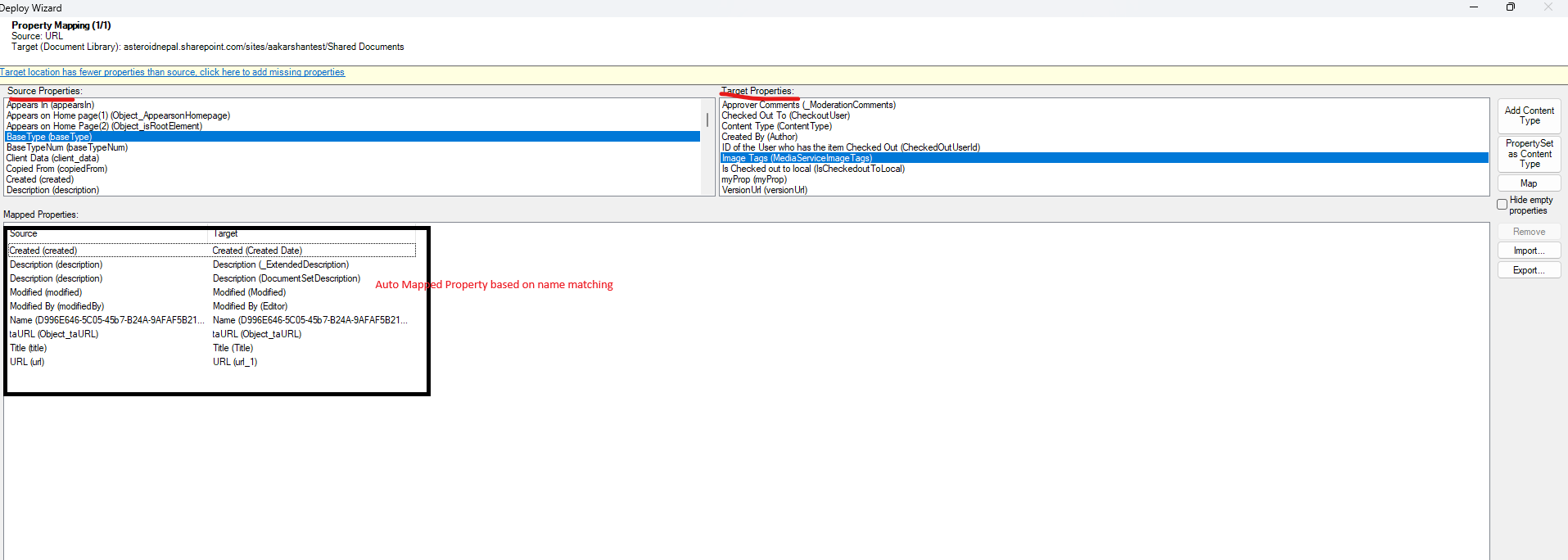
(Screenshot of Tzunami Tool)
2. Support for Complex Legacy Systems
Many organizations migrating to SharePoint Online are not starting from simple file shares but are moving from structured ECM platforms like Documentum or OpenText.
This introduces challenges such as:
- Deeply nested structures
- System-specific data models
- Large volumes of content
Opt for migration tools that are specifically designed for these types of environments, enabling organizations to migrate from complex legacy systems without oversimplifying the data.
3. Detection of Path Length Issues and Broken Links
One of the most practical challenges in migration to SharePoint Online is dealing with system limitations, particularly around path lengths and link integrity.
If they are not identified early, it can result in:
- Migration failures
- Inaccessible files
- Broken references within documents
Use a tool that detects:
- Path length issues
- Broken or invalid links
This allows teams to address problems before migration, and reduces disruption and avoids post-migration cleanup.
4. Pre-Migration Analysis
Successful migrations are defined as much by preparation as by execution.
Before any data is moved, organizations need visibility into:
- What content exists
- How it is structured
- What issues may impact migration
Tools like Tzunami provide pre-migration analysis capabilities that help identify potential challenges early and allow for better planning and more predictable outcomes.
5. Ability to Handle Large Volumes of Content
Enterprise migrations often involve significant amounts of data accumulated over time.
Migration software must be able to:
- Process large repositories efficiently
- Support phased or staged migrations
- Operate reliably under scale
This becomes especially important in environments where content cannot be migrated all at once and needs to be moved in controlled phases without disrupting your ongoing operations.
Bringing It Together
Choosing migration software for SharePoint Online is about selecting a solution that can handle real-world complexity without bringing unnecessary risk.
Capabilities like accurate metadata migration, support for legacy systems, pre-migration analysis, and issue detection are essential and cannot be neglected.
Solutions like Tzunami Inc. focus on these fundamentals, helping organizations approach migration to SharePoint Online in a structured and controlled way.