
Today we are announcing a huge evolution in Tzunami Deployer with new features and software improvements to propel your migration towards Office 365.
During the past few months, we have been continuously improving our migration solutions, the new version of Tzunami Deployer will ensure your migration experience is faster, more productive and support complex scenarios. Migrate only security, new approach towards Metadata Transformation and additional features and improvements implemented to help you with a successful Office 365 Migration. You can do so much more with Tzunami Deployer’s latest version. Here is a highlight of recent changes:
Special Features
- Support for Metadata Transformation during Migration.
Beside Metadata Columns and properties migrated as is to Office 365. Tzunami now supports a new feature to configure and transform/formulate metadata values during migration. Create a new property or change the existing values from the source system into the target system. Map specific values from the source or set custom values while migrating the content. This is a part of the deployment (Virtual simulated migration) and does not affect the target site until you are ready to migrate into SharePoint.
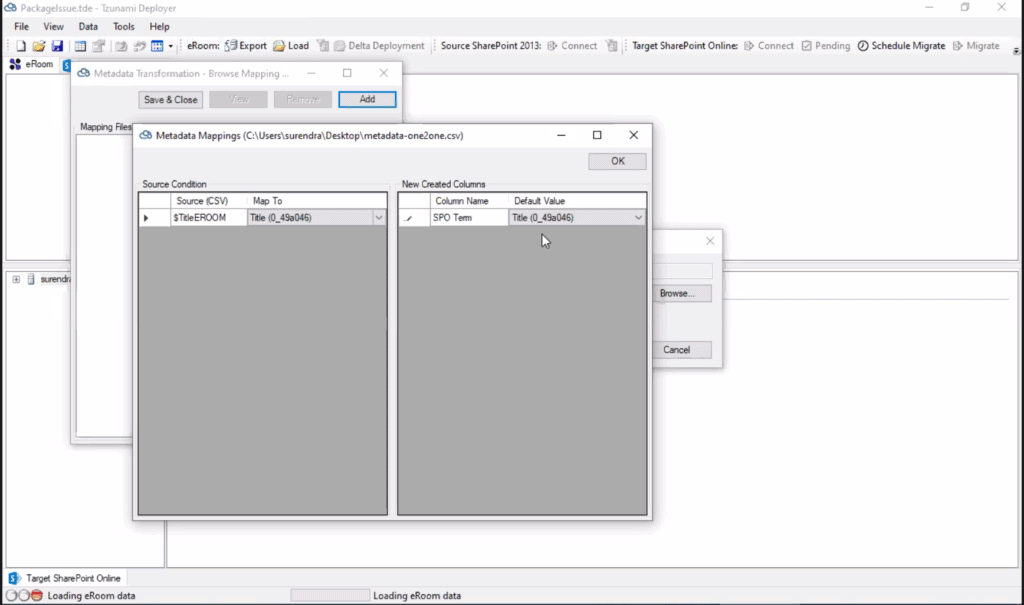
- Metadata merging
Merge multiple metadata properties from your source system into one delimited value. Eliminate Colum threshold issues when migrating to O365 - Orphan Users
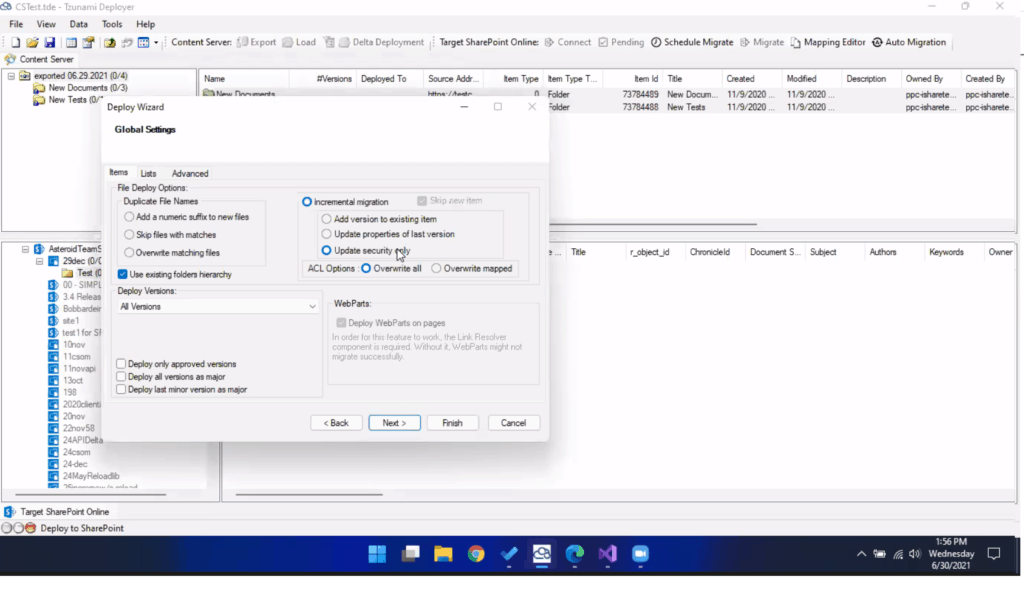
Compatible with Migration API – Maintain values of orphaned entities during migration: Created by, Modified by – preserved as in your source ECM. - Support for Security Only Migration (Segregated ACL) – Apply security after data is migrated into Office 365.
Deployer Post Migration Process can assign security as a scheduled operation and during delta migration process.
Just transfer the data quickly and then migrate only the permissions even after hours with a few clicks. This feature is very useful for a two-phase migration, first of all we can migrate data and structure, applying security when needed.
During the security migration you have the option of overwrite all acl (overwrite target ACL already migrated by deployer) or overwrite mapped (overwriting only the mapped entities in Deployer).
New Features
- Support for ‘Retry’ feature on same instance of exporter in case of failure to download items or fetch security.
- Support for extracting Business Workspace from Live Link 10.x,
- Support for extracting ‘Related Items’ as well as Custom Metadata from HPECM.
- Support for ‘Split’ feature in Deployer that allows the user to Split the Source Folder Content. Set the configuration for max item count in a specific list.
Keep everything in check when migrating into SharePoint and according to your needs.
Deployer will split and restructure source content automatically.
- Better Support for exporting Security and Business Workspace from Content Server 16.x and 20.x.
Improved Features
- Implemented DB approach to extract metadata from DocuShare Collection.
- DocuShare DB approach stabilization and Quick analysis Improvements.
- Improvements in the use of Azure App Authentication when migrating to Office 365.
- Read hidden lists from SharePoint Site Collection.
All these new features support SharePoint & Office 365 migration from various ECM systems. If you want to try for free these new features, have any questions or further feedback, please share your thoughts with us.
Ready to test the Tzunami Deployer’s newest version?
Click on the button below and send us your contact details to get started

How to Choose the Right Migration Software for SharePoint Online
TL;DR Choosing the right migration software for SharePoint Online is critical to avoiding data loss, broken structures, and costly rework. The best tools go beyond

File Server to SharePoint Migration: The Role of Information Lifecycle Management
TL;DR Most file server to SharePoint migration projects fail because everything gets migrated, including redundant data, without structure; information lifecycle management helps clean, organize, and
5 SharePoint Migration Mistakes (and Ways to Avoid Them)
TL;DR SharePoint migrations often fail because important elements like permissions, metadata, version history, and internal links are not migrated correctly. Read on to learn how

Delta SharePoint Migration: 5 Insights for Secure Enterprise Content Management
TL;DR “All-at-once” approach of content migrations is high risk and hard to control. A delta approach moves data in stages, syncing only what changes after