If your team is managing documents in Documentum and you’re thinking about switching to SharePoint, you might be wondering:
Is it worth it? What are the challenges? And how do you move everything safely, without breaking links, losing metadata, or causing a mess?
This blog will help you understand the key differences between Documentum and SharePoint, why many companies are migrating, and how to do it with the right tools and planning.
What’s The Difference Between Documentum And SharePoint?
What is Documentum?
Documentum is an enterprise content management (ECM) system. It’s been around for a long time and is known for handling large amounts of structured content and workflows. You’ll often find it used in industries like pharmaceuticals, energy, or government, especially where compliance is critical.
Strengths of Documentum:
- Strong metadata and versioning
- Workflow and compliance capabilities
- Good for structured document processes
But it also has challenges:
- It can be expensive to maintain
- Requires technical expertise to manage
- Often hosted on-premises, which limits flexibility
What Is SharePoint?
SharePoint is Microsoft’s content and collaboration platform. It’s widely used in the cloud (through Microsoft 365), but can also be hosted on-premises. It’s known for being user-friendly and tightly integrated with tools like Teams, OneDrive, and Outlook.
Strengths of SharePoint:
- Easy to use and widely adopted
- Cloud-based and scalable
- Great for collaboration and sharing
Limitations to be aware of:
- May require extra setup for advanced metadata
- Workflow features aren’t as structured out of the box as Documentum’s
- It can get messy if not governed properly
Why Are Organizations Migrating from Documentum to SharePoint?
Here’s an example:
A government agency used Documentum for over a decade. Over time, the platform became costly to upgrade. Their users found it hard to access documents remotely, and younger employees preferred tools like Teams and OneDrive. They decided to move to SharePoint Online, but the challenge was moving not just the files, but also permissions, metadata, and structure.
That’s the core issue: migration is never about just moving files.
You need to preserve:
- File structures and folders
- Metadata (like author, creation date, custom tags)
- Permissions (who can see or edit what)
- Document versions
- Internal links between documents
How Do You Migrate From Documentum To SharePoint Without Losing Control?
You have two main options:
Option 1: Manual migration or basic file copy tools
You can export files from Documentum and upload them into SharePoint manually or with basic file transfer tools. But this usually:
- Does not preserve metadata or permissions
- Loses version history
- Breaks links between documents
- Takes a lot of manual effort
These tools are great for personal or small team file moves, not for enterprise-level migrations.
Option 2: Use a purpose-built file server migration tool like Tzunami Deployer
Tzunami Deployer is designed to migrate content from systems like Documentum into SharePoint safely and with full control.
Here’s how it works:
1. Connects to Documentum and extracts content, including metadata, security settings, and versions.
2. Let’s you map Documentum fields to SharePoint columns, so nothing gets lost in translation
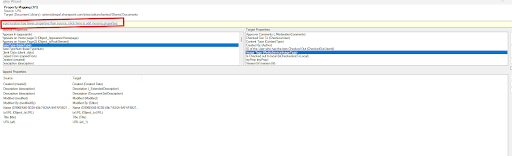
3. Migrate the content after mapping users, roles, properties, values and many more.
4. Verify the content using a tool called post migration verification tool which will verify whether files are migrated or not with validation of some metadata and ACL
5. Supports delta migration , meaning you can migrate in phases or re-run to capture changes
6. Updates internal links automatically using a tool called the Link Resolver
7. Keeps permissions intact, so users get the right access after migration
Before and After Migration: A Simple Comparison
| Feature/Process | Before (in Documentum) | After (in SharePoint with Tzunami) |
| File Access | On-premises or VPN only | Cloud-based, remote-friendly |
| Metadata | Stored in Documentum fields | Mapped to SharePoint columns |
| Permissions | Custom ACLs and roles | Translated into SharePoint permissions |
| Version History | Stored per document | Carried over into SharePoint |
| Document Links | Internal Documentum paths | Automatically resolved in SharePoint |
| User Experience | Complex, legacy UI | Modern, integrated with M365 |
Common Mistakes To Avoid
Mistake 1: Moving only the files
It’s tempting to treat the migration as a file copy job. But if you skip metadata, versions, and permissions, you end up with a pile of documents and no structure.
What to do instead:
Use a tool like Tzunami Deployer that keeps everything together.
Mistake 2: Migrating everything at once
Trying to move all your data in one shot can overwhelm the system and your team. It’s risky and hard to test.
What to do instead:
Break the migration into phases. Use delta migration for any changes. Test in a sandbox before going live.
What Does A Successful Migration Look Like?
Here’s what success usually means:
- Files, folders, metadata, and versions are all migrated cleanly
- Permissions are preserved, and users can access what they need
- Internal links still work and no broken references
- Everything is tested before going live
- The migration is tracked and documented
Frequently Asked Questions
1. Does SharePoint support everything Documentum does?
Not exactly. They are different platforms. SharePoint is more user-friendly and better for collaboration, but Documentum has stronger, structured workflows. You may need to redesign some processes in SharePoint.
2. Will I lose metadata if I move to SharePoint?
Not if you use the right migration tool. Tzunami lets you map metadata fields from Documentum to SharePoint.
3. Can I keep my old permissions when migrating?
Yes. Tzunami Deployer supports permission mapping so your access controls stay in place.
4. What happens to version history?
Versions can be carried over to SharePoint during migration if you configure it correctly.
5. Is this only for Documentum?
No, Tzunami supports many systems, including OpenText, LiveLink, FileNet, Confluence, and more.
Final Thoughts
If you’re planning a move, take the time to do it right; test, map, and migrate in phases. And if you need a hand, Tzunami is built for jobs like this.
Want to learn more? Contact Tzunami for a demo or free consultation.