
Are you thinking of migrating to SharePoint? Don’t Leave Your Metadata Behind
When migrating content to SharePoint, most organizations focus on files and folders. But what about everything tied to those files, like tags, version history, permissions, custom fields, and timestamps?
That’s metadata. And without it, your documents lose meaning, context, and compliance value.
Why Does Metadata Matter So Much?
Metadata holds the power to help people find, sort, protect, and work with documents inside SharePoint. It’s also crucial for meeting industry regulations, audit readiness, and enforcing internal governance policies.
In practical terms, metadata includes:
- Author and modified dates
- Custom tags and classifications
- Document types and content types
- Project IDs or department codes
- Version history
- Security permissions
If any of this gets lost during migration, the content becomes less usable and harder to govern.
What Makes Metadata So Tricky To Migrate?
Here’s the challenge: metadata fields in your current ECM system (like OpenText, Documentum, or FileNet) rarely match SharePoint’s structure 1:1.
- Field names might differ
- Data types might not be compatible
- Some metadata might not exist yet in SharePoint
- Custom logic or hierarchies might be tied to specific fields
So, if your migration tool doesn’t account for all of that, you risk losing critical information.
How Does Tzunami Handle Metadata Migration?
Tzunami Deployer was built to solve this exact problem and more. It migrates not just content, but also the metadata that gives that content meaning.
Here’s how it works:
1. Extract Content and Metadata from Your Source System
Tzunami supports direct connectors to major ECM platforms, including OpenText Content Server, Documentum, FileNet, and others. So, it can pull metadata natively(its own api or .NET SDK) without custom scripts or workarounds.
2. Review and Transform Metadata in Tzunami Deployer Studio
Once the data is loaded, you can view, filter, and manage all associated metadata before sending it to SharePoint.
If you need to rename fields or combine two fields into one, Tzunami lets you map and transform metadata so it fits cleanly into your SharePoint environment.
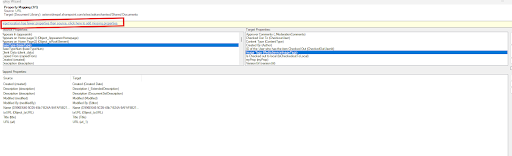
3. Map Properties to SharePoint Fields
You can manually map fields or let Tzunami do it based on patterns. This step ensures your tags, types, and custom data land exactly where they need to in SharePoint.
It also supports:
- Creating new fields in SharePoint if they don’t already exist
- Matching content types
- Preserving system metadata like author, timestamps, and versions
- Aligning permissions across platforms
4. Deploy and Validate
Once everything’s ready, Tzunami deploys the content and metadata into SharePoint. You can also run pilot migrations to preview how metadata lands, and use delta migration to only migrate what’s changed since the initial export.
Get a free demo for this:
What’s The Before And After Look Like?
| Before Migration | After Migration with Tzunami | |
| Metadata Structure | Incompatible, inconsistent | Aligned, transformed, and preserved |
| Version History | Often lost or flattened | Fully retained in SharePoint |
| Permissions | Risk of misconfiguration | Migrated securely with roles and access intact |
| Custom Tags | Dropped or unmatched | Mapped and visible in SharePoint |
Common Mistakes (and How to Avoid Them)
Mistake 1: Skipping Metadata Mapping
Why it happens: Teams focus on moving files rather than their context.
How to fix it: Use Tzunami’s built-in mapping tools to align fields across platforms. Even complex structures can be mapped cleanly.
Mistake 2: Assuming Metadata Will “Just Work”
Why it happens: People think metadata will transfer like file names or folders.
How to fix it: Validate metadata after test migrations. Run pilots before full deployment to confirm everything lands where it should.
Mistake 3: One-Time Migrations Without Delta Support
Why it happens: Teams do one large migration, then scramble when content changes during cutover.
How to fix it: Use Tzunami’s delta migration to keep everything updated, transferring only what’s changed since your last export.
What Does Success Look Like?
When metadata is preserved:
- Search works like it should
- Users find what they need faster
- Permissions stay consistent
- Compliance gaps are avoided
- Content governance remains intact
FAQs
1. Can Tzunami map metadata from non-Microsoft ECMs?
Yes. Tzunami has connectors for OpenText, Documentum, FileNet, eDocs, and more.
2. Can I create new metadata property fields in SharePoint during migration?
Absolutely. Tzunami lets you define and create target fields if they don’t already exist.
3. Does it preserve version history and timestamps?
Yes. Both are retained and transferred into SharePoint’s native versioning system.
4. What if I have different metadata schemas across departments?
Tzunami supports flexible mapping, so you can apply different logic per dataset or site collection.
5. How are permissions handled?
Tzunami migrates item-level, folder-level, and site-level permissions.
Final Takeaway
Preserving metadata is a core requirement of any successful SharePoint migration. Tzunami Deployer ensures nothing gets left behind.