
In 2025, a growing number of IT and operations leaders are rethinking how their teams manage and store knowledge, and for many, that means moving from Confluence to SharePoint.
For them, it’s about control, structure, and long-term sustainability.
What The Experts Say
Even Atlassian acknowledges the difference between the two platforms. In their official comparison, they note that SharePoint is a file repository, best for storing and organizing company-wide files, especially for teams already using Microsoft 365.
Confluence, by contrast, is built for collaborative content creation and cross-team visibility.
What’s The Problem With Confluence Today?
Confluence is widely used for collaboration and team documentation, but as organizations scale, they often run into problems like:
- Unstructured content growth across spaces and pages
- Broken or outdated internal links
- Missing or inconsistent metadata
- Ineffective search due to content sprawl and lack of tagging
- Limited support for compliance and retention policies
Why SharePoint Is The Preferred Destination
Organizations making the move to SharePoint, particularly SharePoint Online, for these benefits:
- Structured content libraries with logical hierarchies
- Metadata support for better filtering and search
- Built-in version history and audit trails
- Microsoft 365 integration (Teams, Outlook, Power Automate, etc.)
- Permission models using Active Directory
In short, SharePoint offers the structure, governance, and long-term control that growing organizations need.
Why Confluence → SharePoint Migration Is Complex
The path from Confluence to SharePoint isn’t so convenient. It comes with unique technical and structural challenges, including:
- Differences in content structure (spaces and nested pages in Confluence vs. folders and libraries in SharePoint)
- Internal links between Confluence pages or attachments that may break during export
- Loss of metadata like author, created date, and modified date
- Permission models that don’t directly translate
- Formatting issues, especially when macros or embedded content are involved
A direct export/import process often results in missing information, broken navigation, and user frustration.
How Tzunami Supports Confluence Migration To SharePoint
Tzunami Deployer is a purpose-built platform for ECM migrations — including support for Confluence Server to SharePoint.
Here’s what’s proven and supported by Tzunami:
1. Structured Content Mapping
Tzunami reads the structure of your Confluence environment, including spaces, pages, and attachments and maps it into SharePoint’s folder and library model.
✔ Helps preserve content hierarchy
✔ Reduces post-migration cleanup
2. Internal Link Resolution
Tzunami supports resolving internal links between pages, attachments, and other referenced content. It helps reduce broken navigation in the new SharePoint environment.
✔ Fixes most internal links during migration
✔ Preserves user experience in the target system
3. Metadata and Version Preservation
During migration, system metadata like creator, creation date, and last modified are retained where possible. This supports compliance, traceability, and proper content history.
✔ Preserves important metadata fields
✔ Maintains version history (when applicable)
4. Permission Mapping
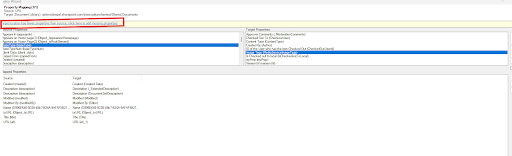
Tzunami migrates Confluence users, groups, and permissions, and maps them into the SharePoint model. You can also manually map fields.
✔ Migrates users and group access
✔ Aligns with SharePoint’s permission structure
5. Selective and Delta Migration
Tzunami lets you filter what gets migrated: by date, user, content type, or other properties. You can also run delta migrations, meaning you only migrate the content that’s changed since your last run.
✔ Enables phased migration
✔ Minimizes downtime and disruption
Before And After: Migration Snapshot
| Category | Before (Confluence) | After (SharePoint via Tzunami) |
| Structure | Disorganized spaces & pages | Logical libraries & folders |
| Links | Broken internal links | Most links resolved |
| Metadata | Often lost | Metadata preserved |
| Permissions | Fragmented, manual | Mapped to SharePoint roles |
| Migration Process | Manual, error-prone | Filtered, validated, incremental |
Common Mistakes To Avoid
❌ Mistake 1: Using Export/Import Alone
Manual export from Confluence typically loses structure, metadata, and links.
✔ Fix: Use Tzunami’s Deployer to automate mapping, preserve metadata, and resolve links during the move.
❌ Mistake 2: Migrating Everything Without Review
Moving every Confluence space as-is brings unnecessary clutter.
✔ Fix: Use Tzunami’s pre-migration analysis and filters to migrate only what’s relevant.
What You Gain With A Successful Migration
- Easier navigation and structured content
- Stronger compliance with metadata and version history
- Fewer broken links and support tickets
- Simpler permission management
- Easy collaboration inside Microsoft 365
And with Tzunami, you get there without compromising your content integrity.
Final Thoughts
The evidence is clear.
A significant number of organizations are already planning to replace Confluence with SharePoint. It’s about building a content system that scales, secures, and serves the business better.
Contact us directly for assistance:
FAQ:
- Can Tzunami migrate Confluence attachments and images?
Yes. Attachments and embedded content are supported. - Will internal links still work?
Tzunami resolves most internal links, including page-to-page and page-to-attachment links. - Is version history retained?
Yes, where applicable. Version management is part of Tzunami’s core features. - Can we migrate selectively?
Yes. You can filter content by space, type, date, or metadata. - Are permissions preserved?
Yes. User and group permissions from Confluence can be mapped into SharePoint roles.