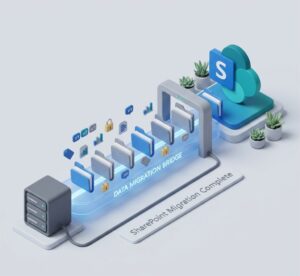
Are you also planning an Extended ECM to SharePoint migration? Many organizations are transitioning away from legacy ECM systems, such as OpenText Extended ECM, in favor of platforms like Microsoft SharePoint or SharePoint Online.
In this guide, we’ll walk you through:
- The main problems companies face during this kind of migration
- The right strategy to follow for success
- The return on investment (ROI) you can expect
- Common mistakes and how to avoid them
What’s the Real Problem with Extended ECM to SharePoint Migration?
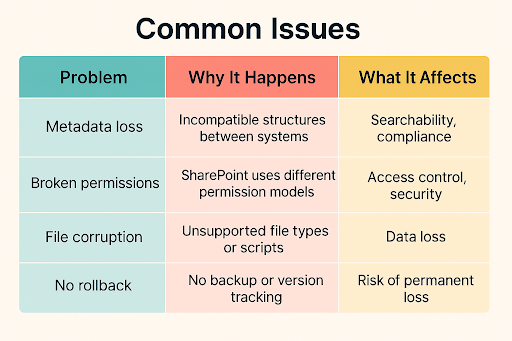
When migrating from OpenText Extended ECM to SharePoint, you’re moving not just documents, but:
- Metadata (like document type, author, tags)
- Permissions (who can access what)
- Version history
- Linked business processes
- Custom structures and folders
Many companies assume they can do this with manual exports or basic tools. That’s where problems begin.
What’s the Best Strategy for Migrating from OpenText Extended ECM to SharePoint?
The best strategy is to break the migration into phases: plan, test, migrate, and optimize. Here’s how Tzunami recommends doing it:
1. Assessment Phase
- Inventory of what content exists in the Extended ECM
- Identify what’s active vs. outdated
- Understand metadata structures, workflows, and dependencies
2. Planning Phase
- Decide what needs to be migrated (not everything does)
- Define the SharePoint structure you’re moving to
- Set permissions mapping rules
- Plan for delta migration if the content will be changing during the process
3. Testing Phase
- Run a pilot migration with a small dataset
- Check metadata, permissions, and document integrity
- Fix issues early
4. Execution Phase
- Run the full migration
- Use a trusted migration tool like Tzunami Deployer to preserve metadata and permissions accurately
5. Validation + Optimization
- Verify data completeness
- Check access controls and metadata fields
- Optimize the new SharePoint structure for usability
What’s the ROI of Migrating from Extended ECM to SharePoint?
You’re not just migrating data, but also modernizing how your business works. Here’s what you gain:
Measurable Benefits:
- Increased productivity: SharePoint is faster, more user-friendly, and integrates with Microsoft 365 apps
- Better search and collaboration: With metadata and tagging preserved, teams can find and share content more easily
- Improved compliance: SharePoint supports retention policies, audit trails, and security at scale
📊 Stat to Know:
According to Forrester, organizations that migrated to SharePoint Online saw a 162% ROI over three years, driven by reduced infrastructure costs and improved employee productivity.
Common Migration Mistakes (And How to Avoid Them)
Mistake #1: Migrating Everything
Not all content needs to be moved. Old, duplicate, or irrelevant files just clog up your new system.
Fix: Do a content audit. Only migrate what’s still valuable.
Mistake #2: Ignoring Metadata Mapping
OpenText Extended ECM and SharePoint don’t use the same metadata fields. You can’t just “copy and paste”.
Fix: Use a migration tool like Tzunami that maps and transforms metadata, and also supports custom metadata field mapping.
Before vs. After: Using Tzunami Deployer
| Step | Before Migration | After Migration to SharePoint |
| Content Storage | Scattered across outdated folders | Structured and searchable libraries |
| Collaboration | Siloed, hard to share | Integrated with Teams, Outlook, and OneDrive |
| Metadata | Inconsistent and unclear | Standardized across departments |
| Performance | Slow access to files | Cloud-optimized speed |
Need help with your Extended ECM to SharePoint migration?
Let our experts walk you through.
🡆 Book a Free Consultation
Final Takeaway
Migrating from Extended ECM to SharePoint is a big move, but if you plan it with the right strategy, proper tools, and an experienced partner, you can make the transition smooth and secure.
Take the time to plan it right, test carefully, and avoid common mistakes.
Frequently Asked Questions (FAQs)
1. How long does it take to migrate from Extended ECM to SharePoint?
It depends on the size and complexity of your content, but typically anywhere from a few weeks to a few months.
2. Is delta migration really necessary?
If your team continues working in Extended ECM during migration, yes. It ensures you don’t lose any recent changes.
3. Can permissions be migrated?
Yes, but they must be mapped carefully to circumvent the structural differences between ECM and SharePoint permissions.
4. Do I need to move everything?
No. Many companies choose to archive or delete unused content during the migration planning phase.
5. What’s the risk of doing it manually?
Manual migration can take a very long time with high risk of data loss, corruption, and broken links. It’s not recommended for enterprise-grade migrations.