

TL;DR
SharePoint migrations often fail because important elements like permissions, metadata, version history, and internal links are not migrated correctly. Read on to learn how to avoid these issues using the right SharePoint migration tools.
Data migrations are notoriously risky. Industry research shows that up to 83% of data migration projects fail or exceed their timelines and budgets due to unexpected technical complexity.
SharePoint migrations are no exception. Organizations often encounter issues such as broken links, incorrect permissions, missing metadata, and unsupported custom workflows after the migration is complete.
These issues usually come from failing to migrate the underlying structure of SharePoint content.
In this blog, we’ll break down 5 common SharePoint migration mistakes that derail real projects and how to avoid them.
1. Ignoring Permission Structures
Permissions are one of the most fragile parts of a SharePoint migration.
According to SharePoint migration studies, complex permission structures are one of the most common challenges during migration projects, especially when mapping old Active Directory users to new cloud identities.
How to avoid it
- Audit your permissions before migration
- Simplify complex permission layers
- Map users and groups correctly in the new environment
Migration tools like Tzunami Deployer preserve permission structures during migration so access rules remain intact.
2. Losing Metadata During Migration
Metadata is what keeps SharePoint content organized and searchable. Fields like document type, department, or project name help users quickly filter and find documents.
During migration, metadata can be lost if the destination SharePoint library doesn’t have the same fields as the source system. When this happens, documents may migrate successfully, but their metadata does not.
How to avoid it
- Review metadata fields before migration
- Ensure the same fields exist in the destination library
- Map metadata properties between source and target systems
Some migration tools allow administrators to manually map metadata fields to prevent this issue.
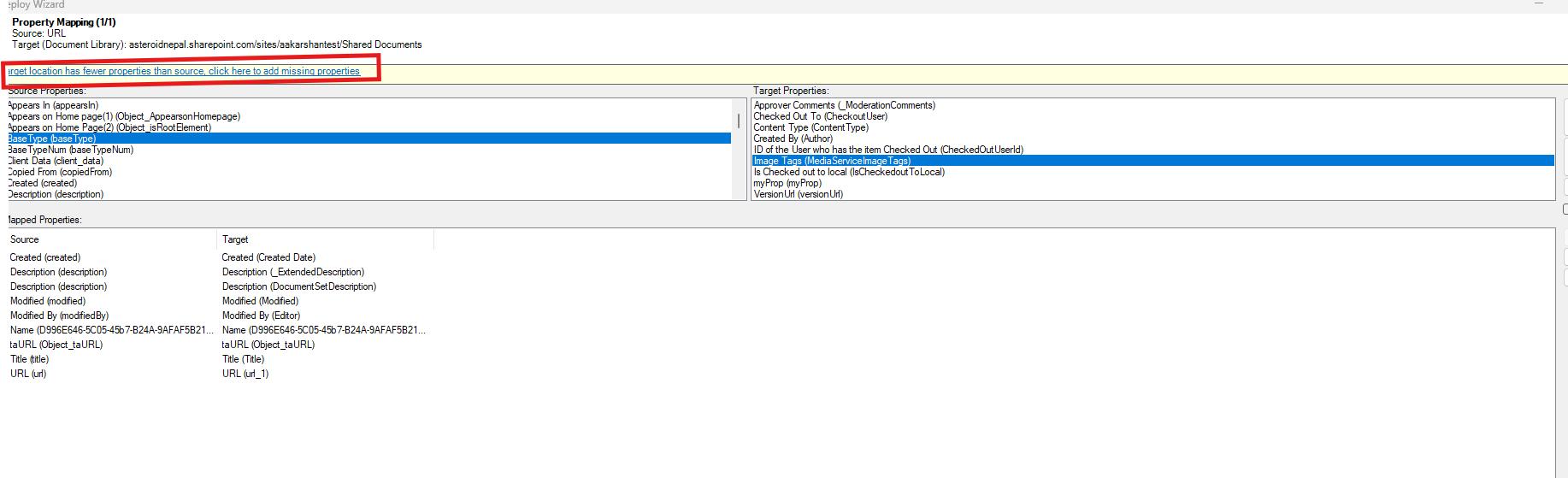
For example, Tzunami Deployer’s property mapping interface detects when the target library has fewer properties than the source and allows users to add or map missing fields before completing the migration.
📌 Contact for a free demo
3. Broken Links Between Documents
SharePoint environments often contain thousands of internal links between documents, pages, and libraries.
When files move to new locations during migration, these links can easily break. As a result, users may encounter missing documents or error pages.
Microsoft documentation also highlights broken links as a common issue when content is moved between SharePoint environments without proper link mapping.
How to avoid it
- Identify internal links before migration
- Use migration tools that support link remapping
- Test important document libraries during pilot migrations
4. Ignoring Version History
Version history allows organizations to track document changes over time.
In some migrations, only the latest version of a document is transferred while earlier versions are left behind. This can create problems for compliance, auditing, and document tracking.
Maintaining version history is especially important for industries where document revisions must be preserved.
How to avoid it
- Verify that version history is included in migration settings
- Test version migration during pilot runs
- Validate results after migration
5. Skipping Test Migrations
Many organizations rush directly into a full migration without testing.
However, running a pilot migration helps your teams identify issues with permissions, metadata mapping, or link structures before they affect the entire environment.
Industry migration guidelines consistently recommend testing migrations with smaller datasets before performing full deployments.
How to avoid it
- Run pilot migrations on smaller datasets
- Validate permissions, metadata, and links
- Collect feedback from test users
Summing Up
SharePoint migrations involve carrying permissions, metadata, version history, and internal links along with the documents. All of these play a critical role in how content functions after migration.
By planning and avoiding these common SharePoint migration mistakes, you can reduce risks and ensure a smoother transformation to SharePoint or Microsoft 365.