
TL;DR
Most file server to SharePoint migration projects fail because everything gets migrated, including redundant data, without structure; information lifecycle management helps clean, organize, and optimize content for a more efficient SharePoint environment. Read on to avoid these pitfalls.
Did you know that most file server-to-SharePoint migration projects fail before they even begin?
Not because of the tools or SharePoint. But because organizations migrate everything that includes years of redundant, obsolete, and trivial data, straight into a platform that demands structure and clarity.
The reality is harsh: 20-30% of enterprise file server content is ROT (redundant, obsolete, or trivial). Yet in most migrations, that data is copied as-is, bringing along broken permissions, outdated files, risks, and deeply nested folder structures that make SharePoint harder to use.
This is why so many organizations end up asking:
“Why is our new SharePoint environment just as messy as the old file server?”
The answer lies in one overlooked discipline: information lifecycle management.
When applied correctly, information lifecycle management turns a file server into a SharePoint migration from a risky data transfer into a controlled, strategic transformation, instead of lifting and shifting chaos.
In this blog, we’ll take a deep dive into how information lifecycle management drives a clean migration approach, focusing on ROT cleanup, retention, and labeling, folder-to-metadata transformation, and permission rationalization.
1. ROT Cleanup: Reducing What Should Never Be Migrated
A major challenge in any file server to SharePoint migration is determining what not to move.
Multiple industry studies highlight the scale of the issue:
- Veritas (Data Genomics Index) reports that up to 52% of enterprise data is “dark data” content that is unknown, unused, or unclassified
- Gartner estimates poor data quality costs organizations an average of $12.9 million yearly from inefficiencies.
This means that a significant portion of file server content provides little to no business value yet is still often migrated.
Tzunami helps address this by enabling:
- Visibility into file structure, size, and scope
- Selective migration, allowing teams to include or exclude content based on defined criteria
This allows organizations to make informed decisions and avoid transferring large volumes of redundant or low-value data into SharePoint.
2. Handling Large Volumes and Migration Performance
One of the biggest challenges in migrating from file servers to SharePoint is dealing with the sheer volume of data.
Enterprise file servers often contain:
- Millions of files
- Deep folder structures
- Large file sizes accumulated over the years
Without proper planning, this can lead to:
- Slow migration speeds
- System throttling in SharePoint
- Extended migration timelines
Microsoft recommends breaking migrations into smaller, manageable batches to improve performance and reduce risk during large-scale transfers.
A structured approach to migration helps organizations:
- Prioritize critical content
- Migrate in phases instead of all at once
- Avoid overwhelming the target environment
📌Contact us for a free demo for SharePoint Migration
3. Folder-to-Metadata, Mapping, and Structure
File servers rely heavily on folders to organize content, but this approach often becomes inefficient at scale. In contrast, SharePoint is designed around a metadata-driven organization, where content can be filtered, searched, and managed without relying on rigid folder paths.
During a file server to SharePoint migration, this creates an opportunity to rethink how content is structured.
Instead of simply recreating folders, organizations can map file properties and context into SharePoint metadata fields. This ensures that important information like the created date, author, or document type is preserved in a more flexible and searchable format.
As shown below, property mapping allows source attributes to be aligned with target SharePoint fields
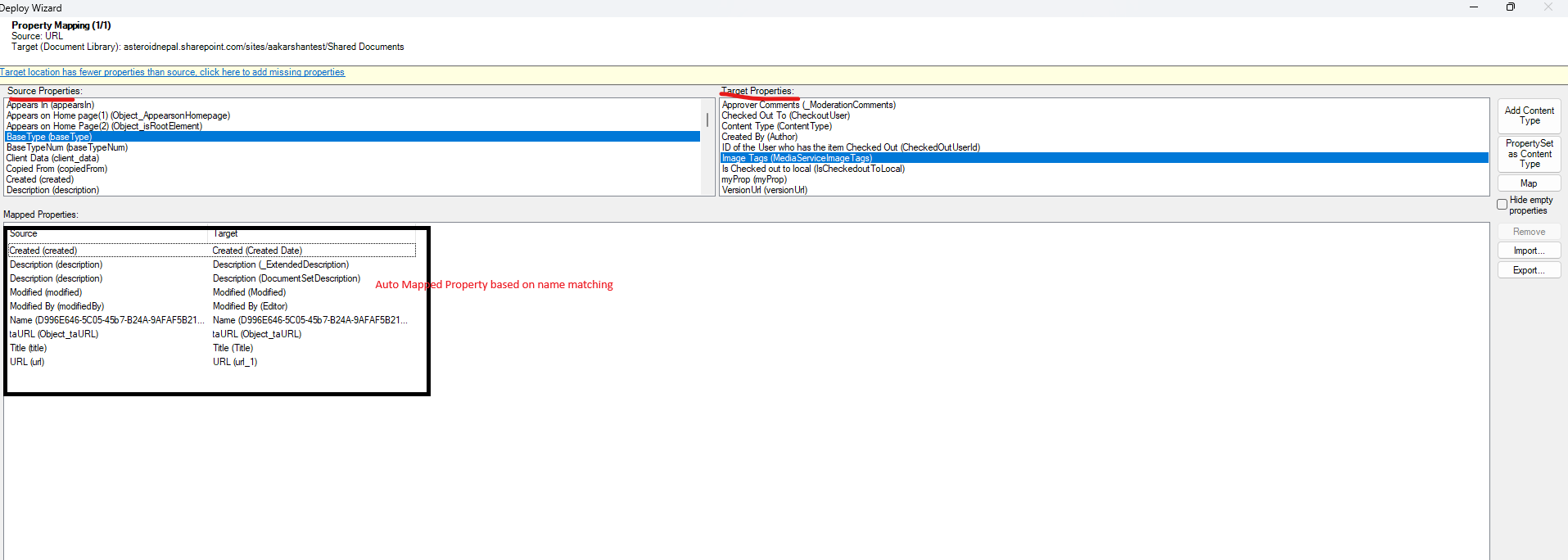
(Screenshot of Tzunami Tool)
This shift from folders to metadata makes content easier to organize, search, and manage. It unlocks the full value of SharePoint beyond simple file storage.
4. Retention and Labeling
File servers rarely have structured retention or classification, making file server to SharePoint migration a good point to bring more order to content.
Instead of moving everything as-is, organizations can use this stage to:
- Identify what should be retained or excluded
- Group content based on relevance
- Align data with the future SharePoint structure
Tzunami supports this process by enabling:
- Structured migration planning
- Content filtering before migration
- Alignment between source and target environments
This helps by making certain your content is better organized from the start and reducing the need for cleanup later.
Summing Up
A successful file server to SharePoint migration is about improving how that data is structured, accessed, and managed.
By applying information lifecycle management, organizations can reduce clutter, preserve critical context, and create a SharePoint environment that is easier to use from day one.
Solutions like Tzunami help enable this approach by providing the control and flexibility needed to plan, filter, and execute migrations with accuracy.